Side stick, also known as cross stick or rim click, is when the drummer lays their drum stick across the snare and hits the stick upon the rim of the snare, giving that “clock” sound, almost like a wood block. A staple of reggae, jazz, and ballads to only name a few. Here’s some methods for working with the side stick in live sound.
Side stick tends to be a bit lower in volume than a snare hit as we hear it through a standard snare top mic, and most times this is a desirable dynamic outcome, as the side stick is many times used in mellower more laid back sections of songs. So one way to work with side stick is to do nothing at all! If it ain’t broke, don’t fix it. Preserve the dynamics.
But lets say you want a bit more side stick. Ride the fader, simply raising the level for the sections of the song that have side stick, and then likely needing to bring it back down to an appropriate level for regular snare hits. If you know exactly when the drummer will and will not be playing side stick, and what the appropriate channel fader position for each sound is, your good to go. Ride the fader up for side stick hits, and then back down for other snare hits.
You could also mult the snare mic channel, bringing the mic into 2 channels. Set the first channel for regular snare hits, and then set the second channel to bring out more sound on side stick hits (you could even process that channel differently to suit.) Then you simply un-mute / mute the second channel at the right moments.
Take that a step farther and add another mic on the snare, one in a place to better capture the sound of the side stick. You will have to get a bit crafty with mic placement and mounting, as you will want to get the microphone aimed at the area that the stick hits the rim without getting in the drummers way, or in a place where the mic will get hit out of position or damaged. Small condenser mics, or side address mics will likely work best. Getting the mic in place can be a bit of a puzzle to figure out depending on the set up. You can possibly use a clamp off of the snare drum itself, though I tend to avoid this. The weight of the mic can alter the sound of the snare (perhaps good, perhaps bad), and even more so, I avoid clamping on to the snare in case the snare needs to be replaced during the show. Though it is somewhat rare to need to swap out snare drums during a show, if one or more mics are attached to the snare itself it will take more time and make switching out the snare drum a bit more of a hassle.
Other possibilities are clamps off of nearby toms, the kick drum, or other hardware. In the example photo below, an LP-Claw is attached to the pole coming out of the top of the kick drum that supports the rack toms. The claw is then placed in-between the kick drum and rack toms, and the Shure Beta-98 with its short gooseneck takes care of the rest.
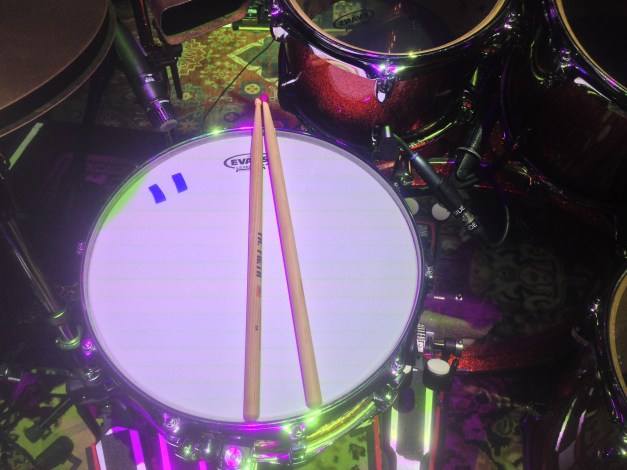
The side stick mic, in this case a Shure Beta-98Amp on the right side of the snare.
In any case, it is very important to make sure that mic will not move and is tight and secure, clear of other drums that might hit against it. Drums bounce about on their own much less on the locally provided drum riser that’s not solid and flexing like a trampoline. I will usually bounce around on the drum riser a bit to make sure that everything is going to stay in place and not hit other nearby items.
Try to get the mic as close to the area that the stick strikes the rim of the drum without getting in the drummers way. Have a talk with your drummer and have them show you their technique to get an idea of a placement that will work.
I consider this second mic to be in addition to the main snare mic. I do not mute the main snare mic when the drummer plays side stick, I just un-mute the second mic and add it in. Set the gain of the side stick mic with the drummer playing side stick. When the drummer hits the snare in a regular fashion most likely the side stick channel will clip out, but this is not a concern as the channel should be muted when not needed. For example, on Ben Harper’s “The Woman In You”, side stick is played on the verse, and regular snare hits on the chorus. I un-mute the side stick mic on the verse, and then right before it goes into the chorus I mute it (the main snare mic is always open).
But lets say you don’t know when the drummer will be playing side stick compared to snare, or perhaps the two techniques are being played in quick secession, making it difficult to accurately mute and un-mute the side stick channel. In this case you can try to use a ducker inserted on the second mic. A ducker being a type of gate. But while a gate decreases the level of a signal when the signal goes below threshold, a ducker decreases the level of the signal when it goes over threshold. With a gate, the signal needs to be above threshold to open the gate, with a ducker the signal needs to be below threshold for the gate to open. Insert a ducker on the side-stick channel and set the side chain input to your normal snare top mic input, so the ducker is using that signal to trigger the ducker that is processing the side stick input itself. Have the drummer play side stick and then set the threshold so that the ducker just closes, then back it down to the point where it remains open. Then when the drummer does regular snare hits, the level of such hits will go past threshold and be ducked (closing the gate). When the drummer hits the quiter side stick, the gate stays open. It might take some work to find that magic threshold level that works with the dynamics of the drummer.
You will likely use the fastest attack time the ducker has available, you want to stop regular snare hits from coming through as fast as possible. Hold and release times can be adjusted to taste, but will also likely be best on the faster settings depending on how fast the drummer switches between side stick and regular snare hits. Finding a ducker that doesn’t “pop” a bit on its fastest settings can be a tall order, especially since the level of the side stick channel will likely be clipping when the snare is hit. Even the fastest ducker out there is not quite quick enough to react to the signal before a bit of the transient already passes through. It can take some time to adjust and find the right settings that work, but even when the “pop” of the ducker closing is obvious when the channel is soloed, it can hide within the snare sound from the main snare mic in the mix fairly well. Consider it “distortion” or “sample” to give a snare that extra crack! Otherwise remember to mute the side stick mic when definitely not required to avoid this.

Another mic set up for side stick, with an LP claw off of a lug of the kick drum.
 Audiosquid